7 min read
AI SEO/GEO Analyst: what do AI assistants say about you?
New in Badgerlytics. One report that scores how well search engines and AI crawlers can read your site, then asks ChatGPT, Gemini and Perplexity the questions your buyers ask — and tells you how often you're mentioned, recommended and cited.
Somebody asked ChatGPT "what's the best CRM for a small sales team?" this morning and got a confident, three-brand answer. Were you in it? If you were, was it because of your own product page or because of a review site's? If you weren't, who was?
That's the question the AI SEO/GEO Analyst is built to answer. It's in beta, on Business and Ultimate plans.
Two halves, one report
| Half | What we do | What you get |
|---|---|---|
| Site health | Crawl a sample of your pages — homepage, the priority pages you name, and a spread across page types from your sitemap and navigation | Five category scores from 0–100 (crawlability, structured data, content, AI readiness, performance) and a list of findings tagged whole-site, page-type or single-page |
| AI answer visibility | Ask ChatGPT, Gemini and Perplexity your tracked prompts, more than once each | How often you're mentioned, how often you're recommended, share of voice against competitors, sentiment, and which pages the engines cite |
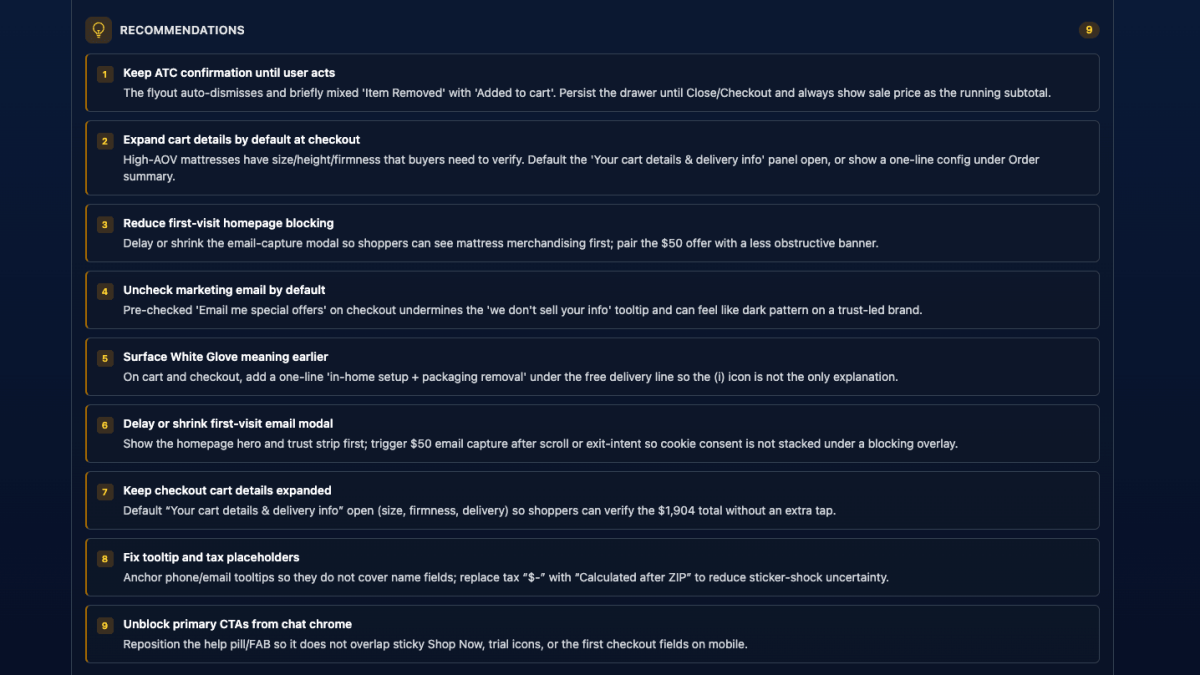
The two halves meet in What to fix first: an ordered list of recommendations with impact, effort, the findings each one resolves, and why it matters for both search and AI answers. Quick wins are called out on their own.
The reason to put these together is that they're the same problem. An engine that "searched" before answering can only quote what it can fetch and read. A product page that takes twelve seconds to load, buries what the product is under a hero video, and has no structured data is invisible twice — once to Google and once to the assistant your buyer actually asked.
Your brand profile
Open the analyst for the first time and we read your homepage and suggest a profile: brand name and aliases, industry, likely competitors, and a starting set of prompts. Nothing to fill in before the first report.
The prompts are the part worth an hour of your attention. Most should be unbranded — "best project management tool for remote teams" — so you learn whether you earn a mention at all. One or two can be branded — "is [your brand] a good buy?" — to see how you're described. The same prompts run on every report, so the numbers are comparable over time. Edit them whenever the business changes.
Competitors drive share of voice and let us tell a rival's website apart from a neutral review site in the citations. The report also lists brands the engines named that aren't on your list yet, which is usually the most uncomfortable table in it.
Choosing which pages get scanned
Reports sample your site rather than crawling all of it, so each time you click Run report we ask how the sample should be chosen. Your answers are saved as defaults.
- Priority pages. Up to 50 pages that matter regardless of traffic — best-sellers, high-margin products, the comparison page sales keeps sending people to. Pick the domain, enter paths one at a time or paste a list with Bulk add. Priority pages are scanned first, always get the deeper content-quality read, and problems on them count more in the score.
- Use analytics to choose pages. On by default. Pages your visitors actually reach take a share of the sample, page types are weighted by traffic, and slow pages are judged on real visitor load times. This only helps once you have history — about 90 days is a good rule. Turn it off and name at least five priority pages instead.
- Never scan paths. Skip account areas, internal tools, anything you don't want judged.
What comes back
- Score and categories. Whole-site and page-type findings weigh more than single-page ones; problems on priority or high-traffic pages weigh more still.
- Visibility tiles. Visibility is the share of answers that mention you at all. Share of voice is your mentions against every brand named. Recommended means the assistant actively suggested you. A by-engine table shows where you're strong and where you're invisible.
- Prompt results. One row per prompt, one column per engine. Expand a row to read what each engine said, which competitors it named and which pages it linked. Searched means the engine ran a live web search first — that answer reflects what it can find on your site today.
- Competitors and sources. Who else gets named, which of your pages engines link to, which competitor and third-party sites they lean on instead, and any claims about your brand that look inaccurate.
- All findings. Filter by severity, category and scope; expand for the fix and the evidence; download the whole list as a CSV for your developers.
- Page-level findings. For your most important pages: does the opening say plainly what the page is and who it's for, how specific is the copy, does the structured data match what's on the page.
Two ways to share it. Download PDF opens a printer-friendly copy of the entire report — every answer and every finding expanded — that you can save and send to a client or an agency. And once you have more than one report, a trend chart tracks score, visibility and share of voice across them.
From report to backlog
The score is a headline. The useful output is a pile of tickets you can write without another meeting — mostly content, tagging, and metadata work, not a redesign.
- Content. Pages that never say what they are or who they're for in the opening, copy too vague for an assistant to quote, or claims that don't match what buyers actually ask.
- Tagging and structured data. Product, article, or FAQ markup that's missing, incomplete, or doesn't match what's on the page — the kind of thing crawlers and answer engines use to decide what a URL is.
- Metadata. Titles, descriptions, and headings that don't name the thing a buyer would search for, so the page is hard to retrieve even when the rest of the site is fine.
What to fix first is already ranked by impact and effort, and every finding is scoped as whole-site, page-type, or single-page. That's the difference between one ticket on a product page and a template change that touches a hundred. Download the findings as a CSV if you want them in the tracker as-is; send the PDF when someone outside the team needs the why.
Cadence and limits
- Reports take roughly 5–15 minutes. The crawl and the engine checks run at the same time, and the page updates as it goes. Cancel any time.
- One report per property every 72 hours. Only finished reports count — a failed or cancelled run lets you try again immediately.
- A report that hits its time limit is saved as partial, with everything that finished and a note on what was cut short.
- Reports stay in your history for six months.
- Business: 3 engines, 10 prompts, up to 40 pages per report. Ultimate: 3 engines, 15 prompts, up to 50 pages.
What it can't do
- It samples. A very large site is judged by its page types. Put the pages that matter on the priority list if you want them checked every time.
- Logins, paywalls, captchas, geo-blocks. Unreachable pages stay unreviewed. Content that only appears after a click — tabs, accordions, infinite scroll — may be partly missed.
- Engines change their minds. Answers are personalised and vary from one ask to the next. We ask more than once to smooth that out, but treat visibility as a trend across reports, not a precise score.
- Performance timings come from one automated visit. They're a guide, not field data.
And, as with the UX Analyst: recommendations are guidance. Validate structural or content changes with your own measurements before rolling them across a template.
Plans
Business and Ultimate, in beta. Draws from the shared monthly AI allowance along with AI Insights, the Chat Analyst, Team Summary, the UX Analyst and Session Replay analysis. Details on the pricing page.
Docs: AI SEO/GEO Analyst (Beta). Run it once before you touch anything, fix the top three, and run it again in 72 hours. That's the loop.
Quick answers
- What is GEO and how is it different from SEO?
- SEO is about earning rankings on a search results page. GEO — generative engine optimization — is about earning mentions, recommendations and citations inside the answers that AI assistants like ChatGPT, Gemini and Perplexity give. The Badgerlytics report covers both, because the same site problems tend to hurt both.
- How does the AI SEO/GEO Analyst measure visibility?
- You keep a list of prompts a real buyer might ask. Each report asks every enabled engine each prompt more than once and records whether your brand was mentioned, whether it was actively recommended, which competitors were named instead, the sentiment, and which pages the engine linked as sources. Those become visibility, share of voice and citation numbers you can track from report to report.
- Which plans include the AI SEO/GEO Analyst?
- Business and Ultimate. Business reports check 3 engines, 10 prompts and up to 40 pages; Ultimate raises that to 15 prompts and 50 pages. One report can run per property every 72 hours. It's in beta and doesn't require the tracking script.